
See where your project stands
Check the cockpit for progress, deadlines, purchases and deliverables to follow up.
Software by Racinaire · Windows
 LiveProject
 brings together tasks, schedules, purchasing, documents and costs for each project. Get an overview of your jobs from preparation to closure.
Check the cockpit for progress, deadlines, purchases and deliverables to follow up.
Link tasks, owners, dependencies and documents to prepare the next steps.
Compare time, purchasing and other expenses with planned revenue.
Inside the software
Screenshots show the French interface with fictional demonstration data.
Features
Progress, alerts, purchasing, receipts, deliverables and budget come together in one overview. Open the relevant tasks or documents from their indicators.
Organise tasks in List or Kanban views. Set types, categories, priorities, participants, subtasks and comments. Filter by project, owner, status or deadline.
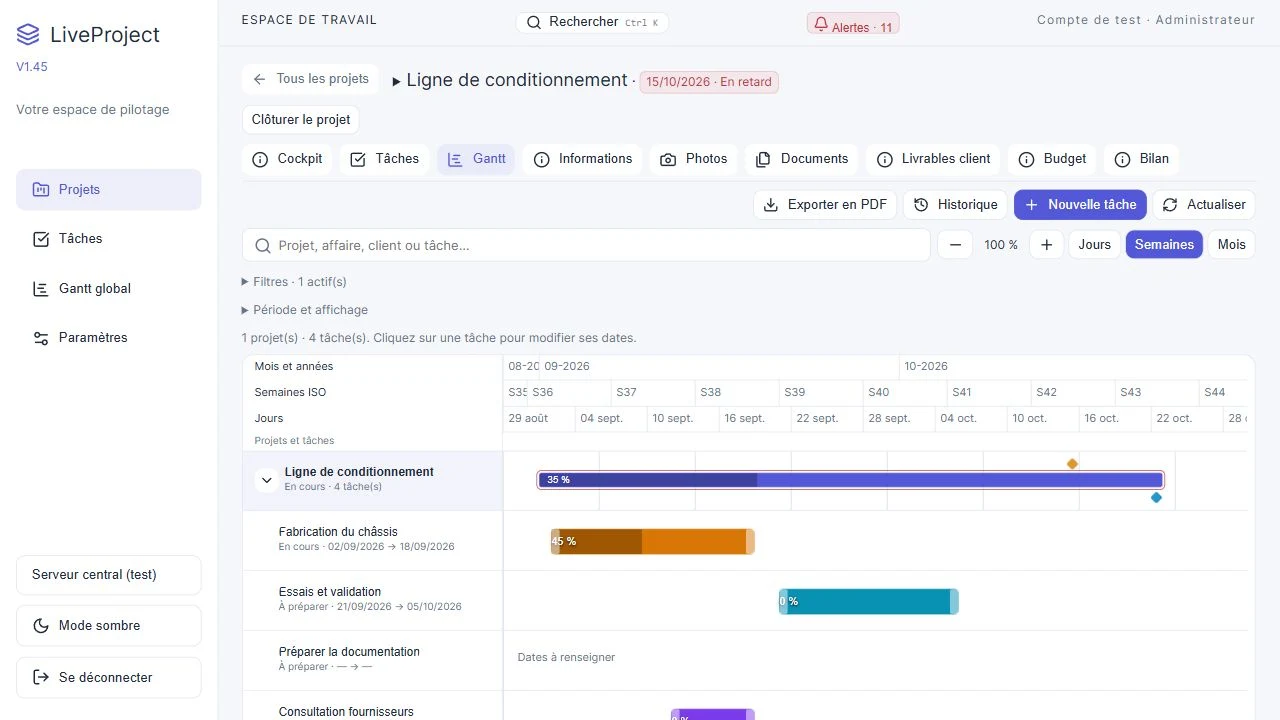
View several jobs on a shared timeline. Drag to adjust dates and durations, link dependencies and use the working calendar, public holidays and day, week or month views.
Prepare a structure of tasks, dependencies and standard deliverables. Customise the template before creating a project to reuse an established workflow.
Compare supplier offers and keep their attachments. Prepare purchase lines, import a text-based PDF order and check suggested values before saving them.
Keep order acknowledgements and delivery notes. Validate lines manually, record partial receipts and see ordered, received and outstanding quantities.
Record planned and actual time with its rates. Track internal costs, purchases, subcontracting and other expenses. Budget and financial review compare available planned, committed and actual amounts.
Attach files to a project or task, view documents and organise photos. Track deliverables from preparation through approval and delivery.
Find deadlines, delays and items needing attention in the alert centre. Use Ctrl+K to search projects, tasks, clients, suppliers, purchases, enquiries and documents within your access rights.
Assign Administrator, Project manager, User or Read-only roles. Associate people with projects and keep client and supplier details, including multiple contacts.
Export the Gantt chart and planning history to PDF with a preview and detail options. Review task changes to understand how the job has evolved.
Review open items and the financial verification before closing a project. Reservations are justified and retained. Back up the database and attachments in a .lpbackup archive.
Use & deployment
The data folder stays with the application. Accounts, projects and documents are managed in this local workspace. A complete backup preserves or transfers the workspace.
For people managing projects or jobs who want to connect work organisation, supplier commitments, deliverables and costs. A demo helps assess how it fits your activity.
The Gantt uses the configured calendar, including working days and public holidays. Dependencies link tasks. Schedule changes follow these rules and can be reviewed in the history.
Import suggests values from PDFs containing text. You check and correct the data before approval. Scanned PDFs and complex tables may need manual entry. Order acknowledgements and delivery notes are kept as documents and their lines are validated manually.
Margins use planned revenue and recorded costs. Missing amounts are flagged and the financial review explains which data is included. Goods receipts are valued using the recorded order prices.
Local mode manages multiple accounts and access rights. The initial central server mode is in testing and limited to remote viewing of projects and tasks. Its scope will be explained during the demo.
A .lpbackup archive contains the database and attachments. The administrator can create it and check a restore from settings. A safety backup precedes restoration. Store the archive in a protected location.
Explore LiveProject in the context of your organisation, jobs and tracking needs.
Request a demo